Chat - Files and images
Display file attachments and inline image previews in the chat thread.
File parts represent file attachments within a message. When the file is an image, an inline preview is rendered. For other file types, a compact chip with a document icon and filename is displayed.
File parts can come from the assistant or a tool (for example, generated charts or documents), and from the user—attachments added in the composer are sent as file parts on the user message. See Attachments for the upload flow.
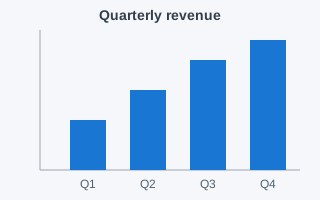
The demo below shows a message containing an image part and a document part:
Assistant
File part structure
A file part is represented by the ChatFileMessagePart interface:
interface ChatFileMessagePart {
  type: 'file';
  mediaType: string;
  url: string;
  filename?: string;
}
| Field | Type | Description |
|---|---|---|
type |
'file' |
Discriminant for the part type union |
mediaType |
string |
MIME type of the file (for example, 'image/png', 'application/pdf') |
url |
string |
URL to the file resource |
filename |
string |
Optional display name for the file |
Example data
const message: ChatMessage = {
  id: 'msg-1',
  role: 'assistant',
  parts: [
    { type: 'text', text: 'Here are the requested files:' },
    {
      type: 'file',
      mediaType: 'image/png',
      url: 'https://example.com/chart.png',
      filename: 'quarterly-chart.png',
    },
    {
      type: 'file',
      mediaType: 'application/pdf',
      url: 'https://example.com/report.pdf',
      filename: 'Q4-report.pdf',
    },
  ],
};
Rendering behavior
The built-in file part renderer automatically detects images by checking whether mediaType starts with 'image/':
- Images—rendered as an
<img>preview wrapped in a link to the full-size resource. InChatBox, the preview is styled as a small thumbnail inside a compact chip; use thepreviewslot orslotPropsto render a larger preview (see the customization demo below). - Other files—rendered as a compact chip with a document icon and the filename (or URL as fallback), linking to the file.
Both variants open the file in a new tab when clicked—the link sets target="_blank" together with rel="noreferrer noopener".
When using the headless FilePart directly, the default img element is unstyled and renders at its natural size—constrain it through the preview slot or CSS (for example, max-width).
Always provide filename when possible: it becomes the image's alt text and the chip's visible label (the document icon is hidden from assistive technology), so it is what screen readers announce for the link.
Inside the message list, the file link participates in the roving focus model—it is reachable with the keyboard after drilling into the message with Enter.
See Accessibility.
Slots reference
The FilePart component exposes four slots for customization:
FilePart is a headless building block imported from @mui/x-chat/headless—it has no standalone API page.
In ChatBox, you configure it through ChatMessageContent via slotProps.messageContent.partProps.file, as shown below.
For building fully custom part renderers, see Custom parts.
| Slot | Default element | Description |
|---|---|---|
root |
div |
Outer container |
preview |
img |
Image preview (only rendered for images) |
link |
a |
Clickable link wrapping the content |
filename |
span |
Filename text |
FilePart does not expose utility classes.
Style it by passing className/sx through slotProps (for example slotProps: { preview: { className: 'my-preview' } }), by replacing a slot with a styled component, or via the owner state described below for conditional styling.
When using ChatBox, the Material file-part slots also respond to theme styleOverrides on MuiChatMessage (slot keys fileRoot, filePreview, fileLink, fileFilename).
Customizing via ChatBox
Override file part rendering through slotProps.messageContent.partProps.file:
<ChatBox
  adapter={adapter}
  slotProps={{
    messageContent: {
      partProps: {
        file: {
          slots: {
            root: MyCustomFileRoot,
          },
        },
      },
    },
  }}
/>
The demo below replaces the default chip with a card-style preview:
Assistant
Streaming
File parts arrive as a single file chunk in the stream—they are not delivered incrementally like text parts:
interface ChatFileChunk {
  type: 'file';
  id?: string;
  mediaType: string;
  url: string;
  filename?: string;
}
The runtime appends the file part to the message's parts array when the chunk arrives.
Owner state
The FilePart component computes an owner state that slot components can use for conditional styling:
| Property | Type | Description |
|---|---|---|
image |
boolean |
Whether the file is an image |
mediaType |
string |
MIME type of the file |
messageId |
string |
ID of the parent message |
role |
ChatRole |
Role of the message author |
See also
- Text and Markdown for the most common part type
- Sources and citations for reference links in RAG applications
- Custom parts for building custom file viewers
API
See the documentation below for a complete reference to all of the props and classes available to the components mentioned here.